STREAMLINE Your Advertising
Features You Need To Increase ROI Today


Single or Multiple Client Licenses
A single seller with one Amazon Ads account only needs a single license to connect their ads account and work with all the Accounts, Campaigns and Targets inside it. But what if you manage multiple Amazon Ads accounts, for example as an ad agency or management service for multiple clients? With a multiple client license you can add additional Amazon Ads accounts inside AdPartner Suite, and grant selective permissions to them to your users.
Rich User Permissions Model
Users can be created by you to permit others to access or manage your account. Allow read only permissions to only allow monitoring, or admin access for full control over operations. Each user can be granted permissions for each Client in your account, meaning you can grant a user read or write permissions to specific Clients in your account with a single click.
Our rich user model means you can structure your account to keep your security model the way you need it.
Automated Day Parting Done Right
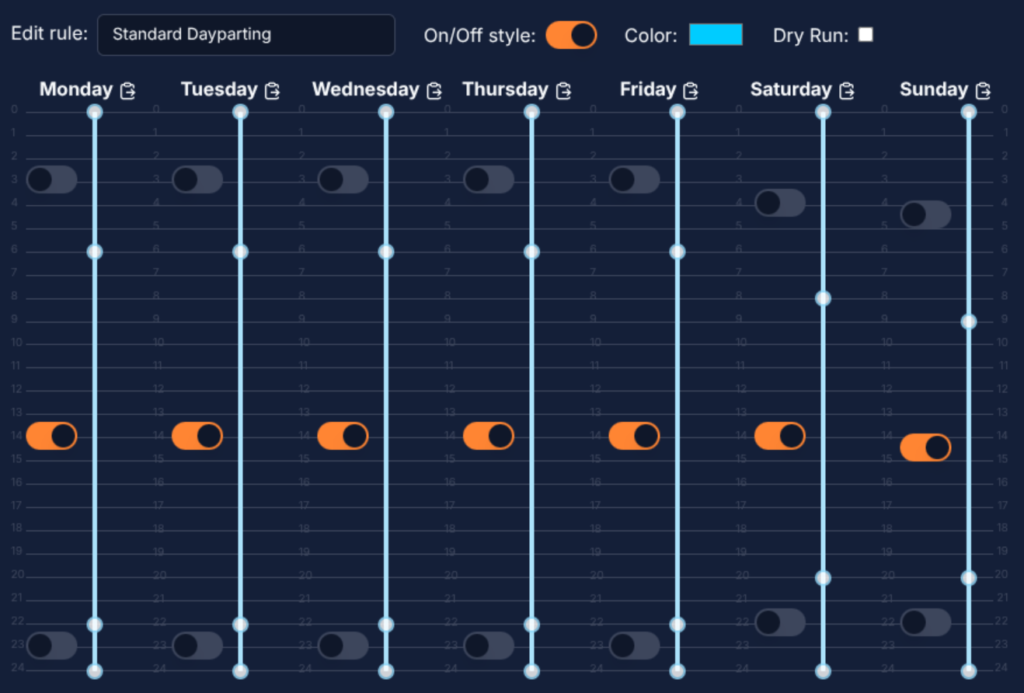
We’ve seen the competition. Building an easy to understand, and easy to apply, day parting setup can be a real chore. And, just when you’ve got your setup just right, you can find that applying the same rules to a different marketplace or timezone becomes a lot of donkey work. We’ve designed our system from the ground up with a few key principles that we think makes it stand out from the rest:
- Timezone agnostic – our rules don’t care what timezone you’re in, they’ll always do the right thing. Apply the same rule to a campaign in the US, Europe or the Far East, and it’ll automatically calculate its operational hours based on the local timezone. The Reporting page makes this timezone comparison even easier.
- On/Off or Percentage based – sometimes you just want to enable or disable campaigns, other times you want fine control of budget throughout the day. Toggle this setting and easily choose which style you want to use throughout the week.
- Start and End Hour boundaries – each period is defined by a start and end hour. Want to specify that a rule is ‘on’ between 6am and 6pm? You don’t have to click every hour in between, just drag the sliders and you’re there in a couple of clicks.
- Dry Run mode – want to set up a rule and just see what it would do without making actual budget changes to your campaigns? Stick it in Dry Run mode for a while, just don’t forget to turn it on eventually!
Keyword Optimization
Graph Based Algorithm Designer
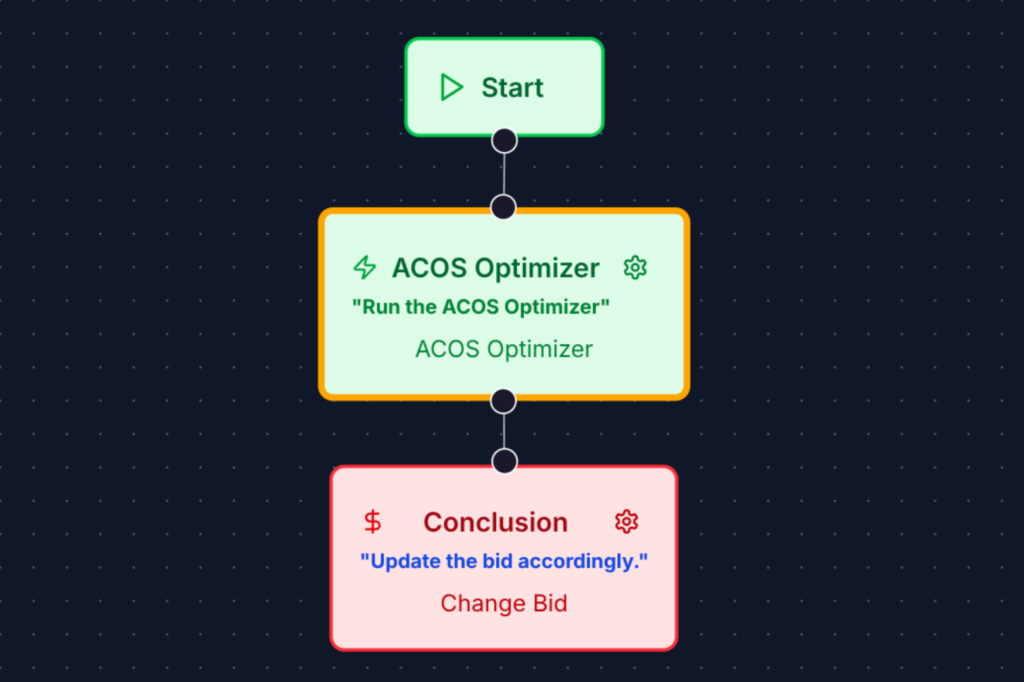
Inspired by some of the world’s leading 3D graphical design software, we’ve built our keyword optimisation engine around what’s known as a Directed Acyclic Graph, which is fancy talk for a series of decisions leading to a conclusion. Get started with our Templates or build one from scratch, it’s easy to put together any algorithm you can dream up without writing a line of code, and the built-in testing tools let you trial run it on real metrics from your account before setting it to work for real. We think you’ll get a real blast from bringing your ideas to life.
ACOSOptimizer Keyword Optimizer
In our Algorithm Designer, we pack a lot of flexibility into our graphing system, allowing you to build any metric based decision system you can dream up. Some optimisations just come naturally, however. When you’re targeting that sweet spot of ACOS performance, well performing keywords and targets will tend to get rise to the top as they earn customer engagement, drive conversions, generate sales and lower ACOS. These are keywords worth carefully balancing the bid budget, happy to spend extra so long as the return on spend is good. On the other hand, poorly performing keywords will tend to suck up your bid budget no matter how much money you throw at them, it won’t help if you double or triple the bid, Amazon may happily spend your money trying to surface your ads but if the customers don’t convert then you’re just throwing money away.
Our bespoke ACOSOptimizer node, available in the Algorithm Designer, incorporates some key insights about when to raise or lower the bid, and by how much, driving well performing targets to do better while downgrading others. Our experience shows that with a 14 day periodic re-evaluation using this node will optimise your budget and make sure Amazon is only taking your bid budget when it’s going to matter to you most.
Available only on the Basic plan and above, we know that you will be getting the best bang for your buck.